TL;DR
How do you keep AI tool costs under control?
On October 28, 2026, GitHub and Anthropic added tools that pick the AI model for you or track what AI costs. More AI tools now charge by how much you use them. Start on the lowest effort setting, and set a spending limit before you let any AI job run on its own.
Why are AI tools picking the model for you now?
A model is the AI "engine" behind a chatbot or coding tool. Some are quick and cheap, others are slower, smarter and cost more per answer. For years you picked one from a menu. That's changing.
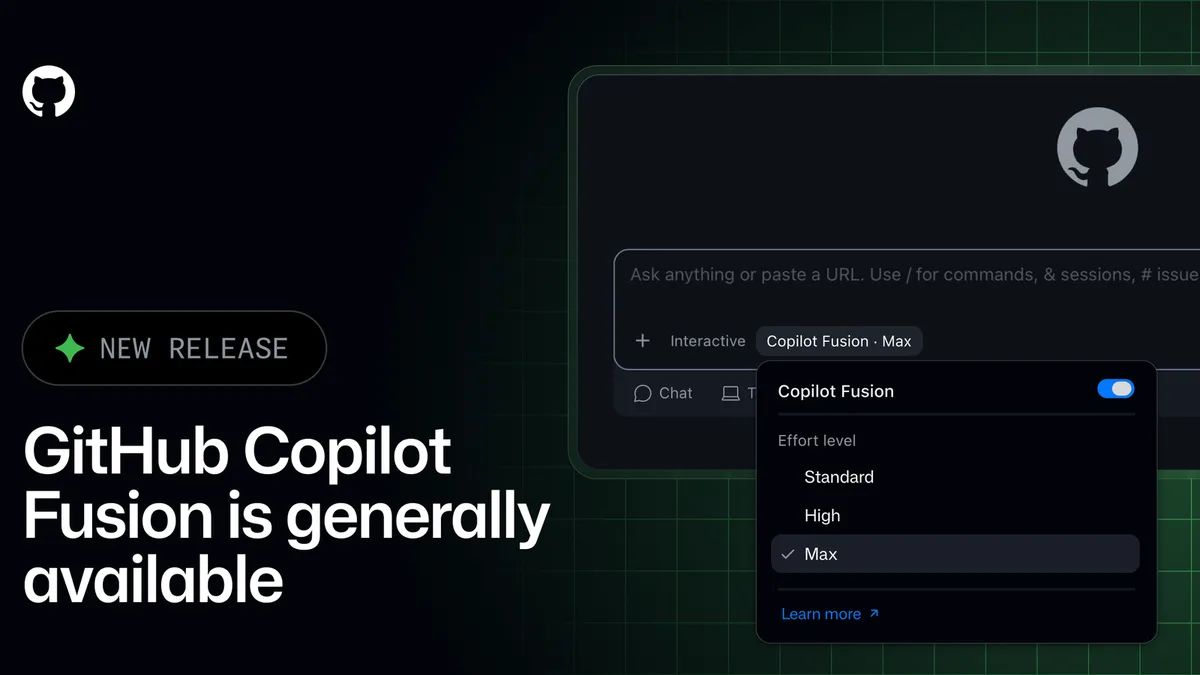
On Wednesday, GitHub made Copilot Fusion available on every Copilot plan. You choose an effort level (Standard, High or Max) and Copilot decides which models handle each request. GitHub also added spending limits to Copilot Automations, the jobs Copilot can run by itself on a schedule. The details, including what's still in preview, are in the news on GitHub Copilot Fusion and Automations.
The same day, Anthropic gave Claude Enterprise customers smart reports that show what each team's AI work costs, plus pooled budgets, one shared monthly budget for a group of people. And the spending these tools manage is growing fast. TechCrunch, citing the engineering analytics firm Jellyfish, reported that spending on AI coding agents is up 10x this year.
Put together, the direction is clear. The tool chooses the model, and you pay for each use.
How does usage-based AI pricing change your bill?
Usage-based pricing means you pay for what the AI actually does instead of a flat monthly fee. GitHub says Fusion bills you for each model it uses, at that model's normal rate. So two requests that look alike can cost different amounts, depending on which models the tool picked behind the scenes.
That works well when the tool picks well, which is GitHub's pitch for Fusion. By its own figures, Fusion Max matched a top rival on a coding test at about half the cost per task. Your own bill can land far from a vendor's average. It depends on your tasks, your effort setting and how often you hit "go".
Two more things push costs up without you noticing:
- Jobs that run while you're away. A scheduled automation can run every hour, every day, or every time something happens. Nobody is watching each run.
- Promotions that end. Paid Copilot plans get 30% off Fusion's model costs, and GitHub's post on X says that runs through November 30. Your habits form at the discount price. The full price arrives in December.
Pick the effort level on purpose, and set the cap before the job ever runs.
What spending limits should you look for in an AI tool?
Most of us aren't on Claude Enterprise or running Copilot for a big team. That's fine. Treat this week's launches as a shopping list of controls to look for in whatever AI tool you pay for.
| Control | What it does | Seen this week in |
|---|---|---|
| Per-run cap | Stops a single job once it hits a set amount | Copilot Automations |
| Daily, weekly or monthly cap | Blocks new runs until the period resets | Copilot Automations |
| Shared team budget | One monthly pot for a group, with personal limits as a backstop | Claude Enterprise pooled budgets |
| Spending alerts | Emails you as you approach the limit | Claude Enterprise (50%, 75%, 95% and 100%) |
| Spend reports | Shows where the money went, by project or task | Claude Enterprise smart reports |
Watch for one detail. GitHub's Automations limits are optional, and GitHub says automations without limits keep running as before. A cap only protects you if you switch it on.
GitHub's own launch post put the spending limit right next to the "set it and forget it" pitch:
Copilot Automations ⚙️
— GitHub (@github) October 28, 2026
Every developer has work they shouldn't have to repeat. Define the job once, then run it on demand, on a schedule, or in response to activity in GitHub or a connected service. Share automations with your team and set their access, actions, and spending limits.
How to set AI spending limits before you automate
A short checklist that works in Copilot, chatbots with usage plans, and most AI tools that bill by use:
- Start on the lowest effort level. In Copilot that's Fusion Standard. Only move up when the answer is wrong or too shallow, and move back down when the hard task is done.
- Cap every automated job. Before any scheduled or triggered job runs, set a monthly cap. Add a per-run cap if it fires on events you don't control, like new emails or new bug reports.
- Turn on alerts. If your tool can email you at, say, half your budget, switch it on. It's the cheapest early warning there is.
- Check usage once a week. Five minutes on a Friday is enough. Look for one job or one person using far more than the rest.
- Put promo end dates in your calendar. For Fusion, that's November 30. Check your usage the week before so the December bill isn't a surprise.
If your tool has none of these controls, that's useful to know. Keep its automations small, or set a spending limit on the payment card you use for it.
When is the higher effort level worth paying for?
Higher effort costs more because it leans on stronger models and more back-and-forth between them. It earns its price on tasks where a wrong answer is expensive: a fix to your checkout page, a tricky spreadsheet formula your invoices depend on, or a change you can't easily undo.
For routine work, like tidying text, renaming files or drafting a first pass, the lowest level is usually enough. If you're unsure, run the same small task once at each level and compare both the result and the usage it logged. That one test tells you more than any leaderboard. A simple rule: if you'd check the result anyway, start low. If a mistake would cost you a customer, go up, then come back down.
Our take
We like model routing. Most people don't know which model fits which task, and they shouldn't have to. Handing that choice to the tool is a good trade, as long as you keep the one decision that matters: how much it can spend.
Our complaint is the defaults. Spending caps that are off until you find them protect careful users and leave everyone else exposed, and the people most likely to skip the settings page are beginners. We'd like every AI tool that runs jobs on its own to ship with a sensible cap switched on.
Until then, the fix takes ten minutes: lowest effort level by default, a cap on anything automated, and a weekly look at the numbers.
— Artificially Nerdy
What to do this week
- Open the billing or usage page of every AI tool you pay for and note whether it offers a spending cap or alerts.
- Set a monthly cap on any AI job that runs on a schedule or trigger.
- Switch Copilot to Fusion Standard if you use it, and only go higher for hard tasks.
- Add November 30 to your calendar if you're using the Fusion discount.
- Pair your caps with limits on what AI agents can touch, using our seven rules for keeping AI agents on a short leash.
FAQ
What happens when an AI tool hits its spending limit?
It depends on the tool. In Copilot Automations, a run stops when it hits its per-run limit, and no new runs start until a daily, weekly or monthly limit resets. In Claude Enterprise, a member stops at whichever runs out first, their own limit or the group budget, and can ask an admin for more.
Do I need Claude Enterprise to set AI spending limits?
No. Pooled budgets and smart reports are Claude Enterprise features, but many AI tools have some form of usage limit or alert on their billing page. If yours has none, a card with its own spending limit is a simple backstop.
Is model routing cheaper than picking a model myself?
Sometimes. GitHub says Fusion Max reached near-top results at about half a rival's cost per task on one test. That's GitHub's claim on one benchmark, so compare your own weekly usage before and after switching.
Why do AI tools charge by usage instead of a flat fee?
Each request costs the provider computing power, and stronger models cost more to run. Usage pricing passes that cost on, which is why the same tool can cost very different amounts from one month to the next.
Sources
- GitHub changelog: Route and orchestrate models with GitHub Copilot Fusion — effort levels, billing at each model's rate, the paid-plan discount and GitHub's benchmark claim.
- GitHub changelog: New tools, triggers, and cost controls for Copilot Automations — per-run, daily, weekly and monthly AI credit limits, and that limits are optional.
- Anthropic: Smart reports, surveys, and pooled group budgets for Claude Enterprise — pooled budgets, member limits, alerts at 50/75/95/100% and spend per workstream.
- TechCrunch: Anthropic just launched tools to show companies what their AI spending is buying — the Jellyfish figure on AI coding agent spending.
- GitHub on X — October 28, 2026, 1:45 p.m. ET post on Copilot Automations and spending limits.
- GitHub on X — October 28, 2026, 12:25 p.m. ET post giving the November 30 discount end date.