TL;DR
What is GitHub Copilot Fusion?
GitHub launched Copilot Fusion, which picks the AI model for each coding task, and Automations, jobs that run by themselves. You don't have to guess which model to use. If you use Copilot, try Fusion on its lowest level, and set a spending cap before you automate any job.
What did GitHub announce at Universe 2026?
GitHub made its announcements at Universe, its yearly conference, on October 28, 2026. Copilot is GitHub's AI assistant for writing and fixing code, and most of Wednesday's news was about it.
The two biggest pieces for everyday users were Copilot Fusion, which is now generally available (finished and open to everyone), and Copilot Automations, jobs that Copilot runs for you on a schedule or when something happens. GitHub also showed several features that are still in preview, meaning early versions that may change.
What does Copilot Fusion do?
AI tools run on models, the AI "engines" that actually write the answer. Some are fast and cheap, others are slower, smarter and pricier. Until now, Copilot users picked one from a list and often forgot to switch back after a hard task.
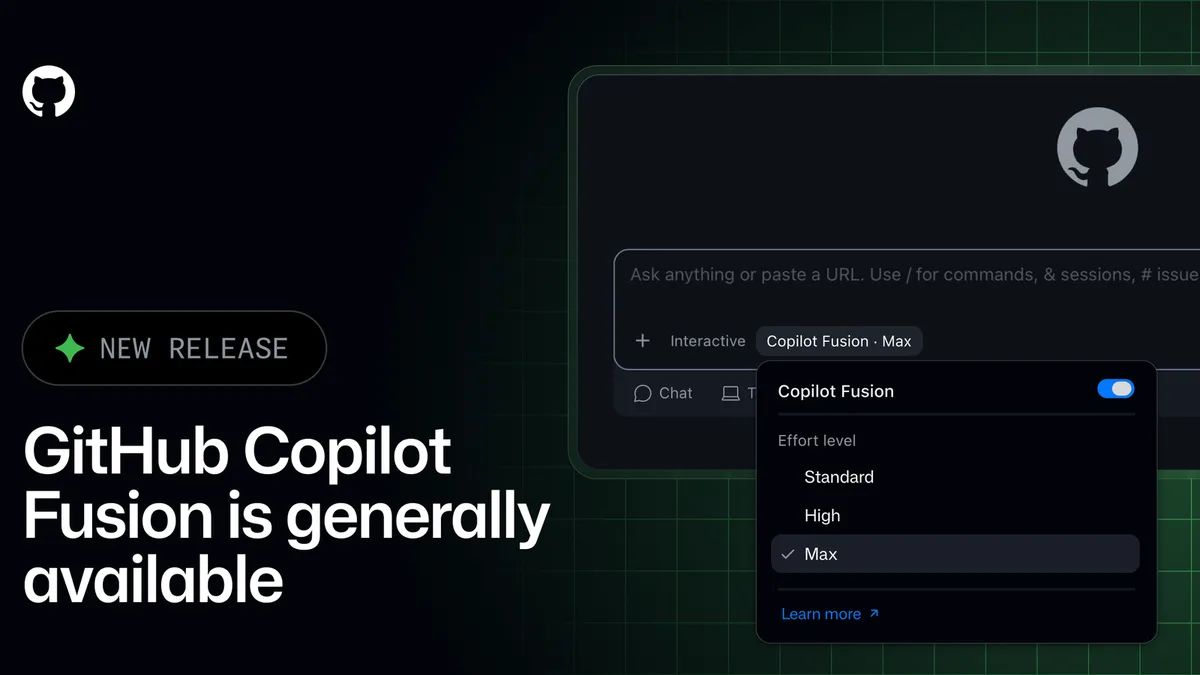
With Fusion, you pick "Copilot Fusion" in the model menu instead of a specific model. GitHub says Fusion then decides, for each request, which models to use and how they work together. Sometimes one model does the whole job. Sometimes a cheaper model drafts an answer and a stronger one steps in only if a quality check fails. Sometimes one model drafts, a second reviews and the first revises.
You still choose how hard it should try:
- Fusion Standard: everyday coding, using versatile models.
- Fusion High: harder problems that need more reasoning.
- Fusion Max: the most demanding tasks, using GitHub's most capable models.
Fusion works in Visual Studio Code (a popular free code editor), the GitHub Copilot app, the Copilot command-line tool and JetBrains code editors. At companies, admins decide which models Fusion may use and can make it the default for everyone.
How much does Copilot Fusion cost?
There's no separate Fusion fee. GitHub says you pay for each model Fusion uses, at that model's standard rate. People on paid Copilot plans get 30% off those model costs for a limited time, and GitHub's post on X puts the end date at November 30.
GitHub also claims Fusion is cheaper per task than a top rival. By its figures, Fusion Max scored 60 on the Artificial Analysis Coding Agent Index, a public test that scores AI coding agents. GitHub says that's within two points of Claude Code, Anthropic's coding agent, running Opus 5.5 Max. It also says Fusion got there at about half the average API cost per task (API means the paid connection apps use to reach a model), using about half the tokens, the chunks of text AI is billed by, and about 40% less time. Those are GitHub's own numbers on one test. Your bill depends on what you ask it to do.
What are Copilot Automations?
An automation is a job you describe once and let Copilot repeat. You set a trigger, which is when it runs (for example "every day at 9am" or "when someone reports a bug"), and the tools it's allowed to use. Copilot then runs the job on GitHub's own computers in the cloud.
GitHub's examples include reproducing a bug as soon as someone reports it, and capturing screenshots when a code change is ready for review. Automations can now also be started from outside services, chained so one job kicks off the next, and connected to MCP servers (MCP is a standard way for apps to plug into AI assistants).
Automations also come with cost controls. They spend AI credits, the usage units GitHub bills Copilot work in. You can now cap each automation per run, per day, per week or per month. A run stops when it hits the per-run cap, and no new runs start until a daily, weekly or monthly cap resets. The limits are optional, though. GitHub says automations without limits keep running as before, so a cap only exists if you set one.
Automations are available on the Copilot Pro, Pro+, Max, Business and Enterprise plans. Shared automations, which a whole team can see and edit and which bill the account that owns the project, are still rolling out.
Which GitHub Universe features are ready and which are in preview?
| Feature | Status | Who can use it |
|---|---|---|
| Copilot Fusion | Generally available | All Copilot plans |
| Copilot Automations | Available (shared automations still rolling out) | Pro, Pro+, Max, Business, Enterprise |
| Connected Copilot cloud experience (start work on the web, phone, app, Slack or Teams and pick it up anywhere) | Generally available | Paid Copilot plans |
| Copilot Projects (one place for a goal, its files, notes and agents, even work outside code) | Public preview | GitHub Copilot app |
| Computer use (Copilot clicks and types in your desktop apps, asking you first) | Public preview | Copilot app on macOS and Windows |
Why should non-coders care about Copilot Fusion?
Most small business owners will never open a code editor. The pattern still matters, because "let the tool choose the model" and "pay for what you use" are spreading to everyday AI tools. Once a tool picks the model, the main thing you control is how much it's allowed to spend.
Agents are also doing a growing share of the work on GitHub. Microsoft CEO Satya Nadella said on Microsoft's earnings call Wednesday that pull requests from AI agents (a pull request is a proposed change to a project's code) are up 6x in six months, and that agents now open more than a third of them. If you pay a freelancer or agency to build your site or app, some of that work is likely already done this way. If you're picking a coding helper for yourself, our guide to AI coding assistants compares the main options.
What people are saying on X
GitHub led with its cost claim, and Nadella's agent numbers came out on Microsoft's call the same day.
Our take
Fusion fixes a real, boring problem. Most people don't know which model suits which task, and the ones who do forget to switch back to the cheap one. Handing that choice to the tool is a sensible default, and starting at Standard is the right habit.
The cost claims deserve a raised eyebrow. "About half the cost" comes from GitHub, on one leaderboard, against one rival. Billing at each model's rate also means you won't know your price until the tool has made its picks. Watch your usage for a couple of weeks before you trust it, and note that the 30% discount ends November 30.
Automations are where a bill can grow while you sleep, so we wish the spending caps were on by default. They aren't. Set one on every automation, even a small one, the day you create it.
— Artificially Nerdy
What to do this week
- Copilot users: switch the model menu to Copilot Fusion at Standard and only move up to High or Max when the answers aren't good enough.
- Put a monthly cap on every automation you create, plus a per-run cap for anything that runs on a trigger.
- Check your Copilot usage once a week for the next month so you know your normal spend before the discount ends November 30.
- Hiring a developer or agency? Ask whether they use AI agents and how AI usage costs show up on your invoice.
- Read our Nerdy View on letting AI tools pick the model while you cap the bill for a checklist that works in any AI tool.
FAQ
Can I still choose a specific model in Copilot?
Yes. Fusion is one option in Copilot's model menu. GitHub's announcement describes selecting it instead of a specific model, so the regular model list is still there if you prefer to pick yourself.
What happens when a Copilot automation hits its spending limit?
If it reaches the per-run limit, that run stops. If it reaches a daily, weekly or monthly limit, new runs won't start until that period resets, according to GitHub.
Will Copilot Fusion use AI models my company has blocked?
No. GitHub says Fusion only uses models enabled in your company's model policies, and admins can remove a model from Fusion without turning it off for everyone.
Is Copilot computer use safe to turn on?
GitHub says Copilot asks for your approval before it controls an app, and companies can switch the feature off. It's a public preview, so try it on low-stakes tasks and keep private files and payment screens out of it.
Sources
- GitHub changelog: Route and orchestrate models with GitHub Copilot Fusion — general availability, effort levels, how it routes, billing, the 30% discount, benchmark claims and supported apps.
- GitHub changelog: New tools, triggers, and cost controls for Copilot Automations — triggers, MCP tools, AI credit limits and eligible plans.
- GitHub changelog: Build shared workflows for your team with Copilot Automations — automation examples and shared automations rollout and billing.
- GitHub changelog: GitHub Copilot app, Universe releases — Copilot Projects and computer use, both in public preview.
- GitHub changelog: A new connected Copilot cloud experience — general availability on paid Copilot plans.
- GitHub blog: GitHub Universe 2026 overview — the full list of Universe announcements.
- GitHub on X — October 28, 2026, 12:25 p.m. ET post with the cost claim and the November 30 discount end date.
- The Transcript on X — October 28, 2026, 5:42 p.m. ET quote of Satya Nadella on agent pull requests.