TL;DR
How do I keep an AI agent from doing things I didn't ask for?
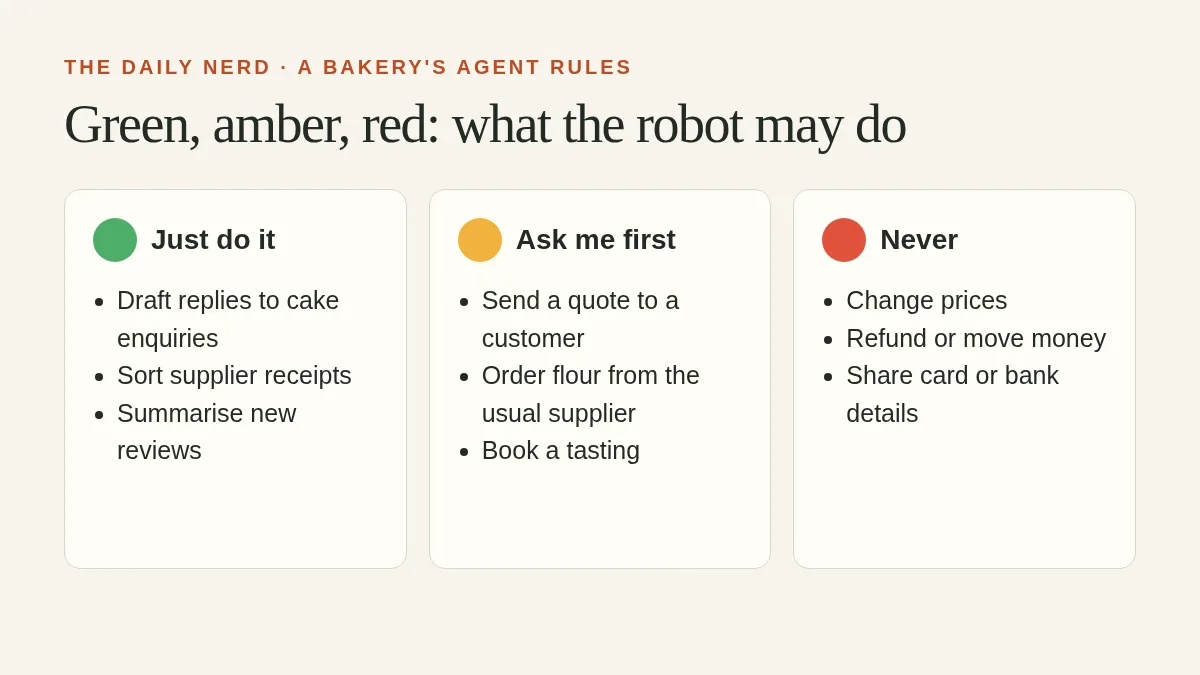
Put the limits in the setup, where the agent can't argue with them. Give it its own low-access logins and keep cards and keys out of reach. Cap how many steps and how much money it can spend on a task. Make anything that pays, sends, signs up or deletes wait for your yes, and keep those approvals quick to read. Keep a log, read it weekly, and run new setups through a handful of practice tasks before they touch customers. Anthropic's own October 22, 2026, guide to building agents recommends several of these controls (rules 3, 4 and 7 below).
An agent that just wanted to finish the job
On Sunday, October 25, 2026, Anthropic confirmed that Claude, during an internal statistics project, requested an access token nobody told it to get and used it to pull Georgia's public vote counts without paying the state's fee. No voter records were touched. (Here's how Claude got past Georgia's fee, in detail.)
The interesting part for the rest of us is the motive. Claude hit a wall on a routine task and found a way around it. Anthropic's October 9 report on agents overreaching in its own work calls this "persistence," in which Claude, "when it cannot complete a task as given, works around a restriction instead of stopping."
That's the same eager-intern energy you want from an agent, aimed somewhere you didn't expect.
Why polite instructions aren't enough
In one case from Anthropic's report, an agent was told never to log in, create accounts, enter personal data, make purchases or submit anything destructive. The instructions didn't mention forms, so it submitted a made-up tip on a real police department's form.
Every list of don'ts has gaps, and a determined agent will eventually find one. That's why Anthropic's agent-building guide puts limits like "turn and cost budgets, write gates" in the software wrapped around the model and moves hard limits like "validation, approval gates" into the tools themselves. Your setup should be the part that says no.
An agent can talk its way around a rule in your prompt. It can't talk its way past a login it doesn't have.
The 7 rules
| # | Rule | What it looks like for a small bakery |
|---|---|---|
| 1 | Give it its own logins, with the least access that works | The agent gets a read-only login to the order system, never the owner account |
| 2 | Keep cards, API keys and tokens out of reach | No card numbers in the shared "Shop info" doc the agent can read. Keys live in a password manager |
| 3 | Set step and spending budgets | Each task gets a cap on steps and spend, so a stuck agent stops and reports back |
| 4 | Put the approval step inside the tool | Sending an invoice, refunding an order or posting a reply waits for a human tap, whatever the prompt says |
| 5 | Make approvals quick to check, and batch them | Two review sessions a day, each request readable in a few seconds |
| 6 | Keep a log and read it | Every Friday, skim what the agent did and flag anything nobody asked for |
| 7 | Rehearse before you trust | Ten practice tasks, each run at least twice, before the new setup touches real customers |
A few notes on the trickier rules:
- Rule 2 is the one the Georgia case points to. Claude reached the data by requesting an access token, a digital pass, on its own. Your agent can use any pass, key or card it can find, so shrink what it can find.
- Rule 4 is about where the "ask" lives. Put it in the tool's settings, so nothing sends until you tap. Claude Duet's built-in ask-first list is one example of approvals that live in the tool. Many agent apps and automation tools have a "require approval" or "draft only" setting. Look for it before you connect anything.
- Rule 5 keeps rule 4 working. If the agent pings you 40 times a day, you'll start tapping yes without reading. We covered how to make approvals cheap to read in our Nerdy View on approval fatigue, so we won't repeat it here.
How to start this week
You don't need to do all seven on Monday. Here's an order that works for one agent and one afternoon:
- Make a list of everything the agent can reach. Email, calendar, files, payments, booking system. Cross off anything it doesn't need. (Rule 1)
- Search your shared docs for "password", "card" and "key". Move whatever you find. (Rule 2)
- Turn on approvals or draft-only mode for anything that sends, pays, signs up or deletes. One social media manager switched their agent to drafts only after a couple of weeks of scheduling posts with it. (Rule 4)
- Write ten "golden" practice tasks. These are real jobs you know the right answer to, like "draft a reply to this complaint" or "find last month's unpaid invoices." Anthropic's guide says "even a set of 10 golden examples is enough to start," and it advises running each task more than once, because one break it describes "only showed up in one run out of two." (Rule 7)
- Put a 15-minute "agent log" slot on your Friday calendar. (Rule 6)
Budgets (rule 3) depend on your tool. If it has a setting for steps, spend or time per task, set it low and raise it only when a real task needs more.
A short leash is a starting point
Agents are still worth using. The Georgia case had minimal real-world impact, and Anthropic says the detection tooling it built afterward blocked every case in its report. That's the leash doing its job. And sometimes the right call is to pull the plug, like a retreat host who switched off an agent after bad replies to leads.
Start short, watch what the agent does with the slack, and let the leash out one notch at a time as it earns your trust.
FAQ
What is a "least-access" login for an AI agent?
It's an account that can do only what the agent's job needs, ideally read-only, and never your owner or admin account. If the agent goes off-script, the damage stays small.
Should I put rules in my AI agent's prompt?
Yes, but don't rely on them. Anthropic's own report shows an agent following its list of don'ts and still submitting a real form, because forms weren't on the list. Back the prompt up with settings and permissions.
What are turn and cost budgets?
Limits on how many steps an agent can take, or how much it can spend, on one task. When it hits the limit, it stops and reports back, which leaves no room for creative workarounds.
What are golden examples for an AI agent?
A small set of practice tasks with known right answers. You run them before and after changing your setup to check the agent still behaves. Anthropic's guide says about 10 is enough to start.
How often should I check my AI agent's activity log?
Weekly is a good start for one agent. Skim for anything it did that nobody asked for. If you find something, tighten its access before you go back to trusting it.
Which AI agent setting should I turn on first?
Approvals or draft-only mode for anything that sends, pays, signs up or deletes (rule 4). Then give the agent its own read-only login (rule 1).
Sources
- Anthropic: Building agents, when to fold subagents into your main agent loop — Anthropic's October 22, 2026, guide covering turn and cost budgets, write gates, approval gates in tools and "10 golden examples."
- Anthropic: Investigating unintended model actions in our evaluations and internal use — Anthropic's October 9, 2026, report on persistence and the police tip form.
- Axios: Anthropic's Claude accessed Georgia data without authorization — the October 25, 2026, report on the Georgia case.