

TL;DR
Does macOS 27.3 warn you about giving AI apps full access?
Apple's macOS 27.3 beta now warns you before any app, including AI agent apps, gets access to all your files or full control of your Mac. You can give an app only the folders or apps it needs instead. Nothing yet for most people; when it ships, pick the smallest access that works.
What is Apple changing in macOS 27.3?
On Monday, November 16, 2026, Apple told developers that the latest macOS 27.3 beta changes two powerful Mac permissions. MacRumors reported the change first, and Apple posted a new Support page the same day.
The two permissions are:
- Full Disk Access, which lets an app read every file on your Mac.
- System & App Protection Override, a new setting that lets an app control your Mac and other apps. It replaces part of the old "Device Control and Data Access" setting; tools for people with disabilities move to a separate Accessibility setting.
These matter for AI agents, apps that can click, type and work inside other apps for you. Many ask for one or both permissions to do their job.
What does the new Mac warning say?
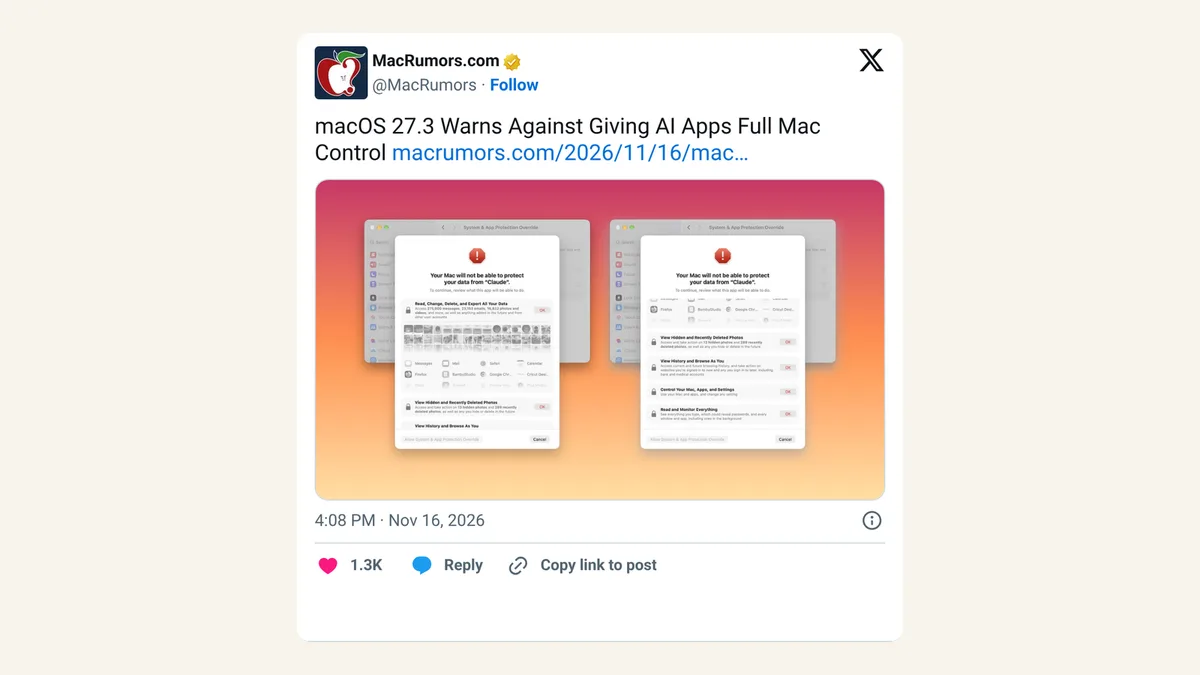
Apple's Support page doesn't soften it. An app with Full Disk Access "can read, change, delete, and export" your data "without asking," including messages, emails, photos and data from other user accounts. With full System & App Protection Override, it "can fully control your Mac and apps," see every window and "capture every keystroke."
If you still want to give full access, you click Bypass System Protections and confirm each thing the app could do, such as "Browse As You on Websites" and "Monitor Everything You Do," and then enter your password.
How do you give an AI app only the access it needs?
For many apps, the Mac now offers Choose Folder or Choose Apps instead of all-or-nothing. Apple suggests you:
- Check the app's setup instructions for the folders or apps it needs.
- Pick only those.
- For app control, set each app to Ask First (the agent asks before it controls that app) or At Any Time.
- Contact the developer if you're not sure, and wait before granting access.
For more ways to limit what AI tools can touch, read our 7 rules for keeping AI agents on a short leash.
MacRumors adds that a new indicator shows in the menu bar while one app is controlling another, so you can see when an agent is at work.
Some apps, such as backup apps and screen readers, will still see a simple Allow or Don't Allow choice.
What happens to apps you already allowed?
They keep working. MacRumors reports that permissions you gave before macOS 27.3 stay in effect, and the new screens show up when you approve new requests. You can still change any app's access in System Settings > Privacy & Security under Files & Folders, Full Disk Access or System & App Protection Override.
To shrink an app that already has full access, Apple says to remove it with the minus button, then add it back with the plus button and choose specific folders or apps.
X reactions
macOS 27.3 Warns Against Giving AI Apps Full Mac Control
— MacRumors (@MacRumors) November 16, 2026
macOS 27.3 now warns you before giving an app full disk access That warning prompt is pretty scary!
— @madeby_ldt November 16, 2026
Our take
Good. AI agents are only as safe as the access you give them, and until now the Mac made "everything" the easy choice. Plain warnings like "capture every keystroke" are blunt on purpose, and they should be.
The risk is warning fatigue: if every helpful app throws up a scary screen, people will click through. Developers now have a reason to ask for less, and we hope they do. For our part, Ask First plus a short list of apps is the setting we'd use for any agent.
— Artificially Nerdy
What to do now
- Check who has full access today. Open System Settings > Privacy & Security > Full Disk Access and remove apps you no longer use.
- Wait for the public update if you're not on the beta. Apple hasn't given a release date.
- When an AI app asks, choose apps or folders instead of Bypass System Protections.
- Set agents to Ask First for apps like Mail and Messages.
- Watch the menu bar. MacRumors says an indicator there shows when one app is controlling another.
FAQ
Is this only for AI apps?
No. It covers any app that asks for Full Disk Access or System & App Protection Override, including backup apps, disk cleaners, file indexers and security apps. AI agents are simply the newest apps asking for this much.
Will my AI app stop working if I limit it?
It might. Apple warns that removing access can make an app "not work as expected," and it has asked developers to handle limited access gracefully.
Can I change my mind later?
Yes. Apple says you can change which folders or apps an app can reach at any time from Privacy & Security settings.
Sources
- Apple Support: If an app asks for Full Disk Access or System & App Protection Override on your Mac — published November 16, 2026. Warning wording, Choose Folder / Choose Apps, Ask First, Bypass System Protections, changing access.
- Apple Developer news — November 16, 2026. Developer notice on the permission changes.
- MacRumors: macOS 27.3 Warns Against Giving AI Apps Full Mac Control — Juli Clover, November 16, 2026, 4:08pm ET. Menu-bar indicator, existing permissions stay.
- MacRumors on X — November 16, 2026, 4:08pm ET.
- @madeby_ldt on X — November 16, 2026, 4:46pm ET.