
TL;DR
Are Tasks in Gemini free now?
Google is making Tasks in Gemini free of charge for hundreds of millions of eligible users in six countries, starting Tuesday. In the U.S., it can call shops, check out with a spending cap, and take jobs by email or text. Open Gemini, switch from Chat to Task, and set a low cap before it buys anything.
What did Google announce?
On Tuesday, November 17, 2026, Google began rolling out Tasks in Gemini free of charge for hundreds of millions of eligible users in the U.S., Japan, Korea, Canada, Australia and India. The work runs on Gemini 4 Hydrogen, Google's new model. Google Gemini posted the news on X at 12:04pm ET.
Update, November 18, 2026: Google says Tasks in Gemini can now also run on Gemini 4 Neon, its new model rolling out to Google AI Pro and Ultra subscribers in the Gemini app.
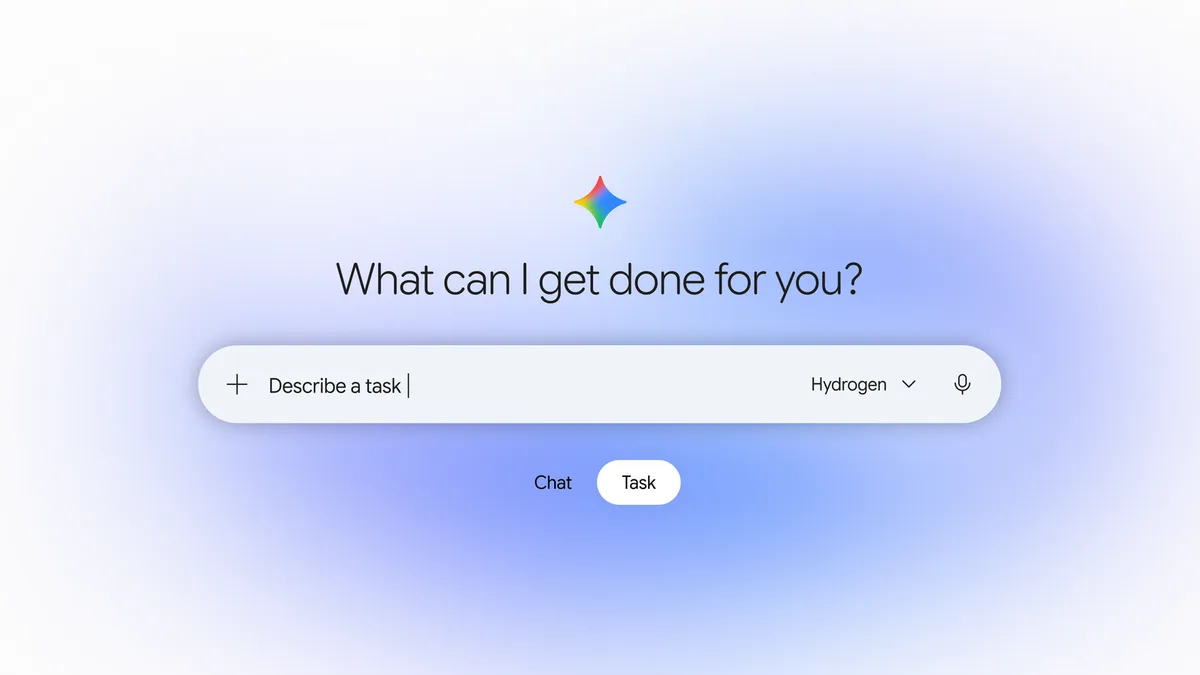
In the Gemini app, Chat is for quick back-and-forth answers. Tasks are for longer projects and recurring schedules. You flip the home-screen toggle from Chat to Task and tell Gemini what you need done. A set of advanced features is starting in the U.S.
What can Tasks in Gemini do now?
- Place phone calls for you. Starting in the U.S., Gemini can dial several shops at once to compare quotes, check inventory or book an appointment. Josh Woodward, a Google vice president, used a service booking at two nearby dealerships as his example and said Gemini found a time and added it to his calendar in less than five minutes. You can cancel a call while it is in progress, then read a summary and a full transcript in the chat.
- Check out with Google Pay. Gemini uses the Agent Payments Protocol (AP2) to pay. You set a hard spending cap up front and pick which stores it can use. Google says Gemini is designed to stay within that cap, and to ask for confirmation or pre-approval before it clicks "Buy," unless you turn on "Always allow." Mastercard and Visa work now; American Express is coming soon. You still get your card's points, cash back and purchase protections, per Google. Receipts, order confirmations and delivery updates go to Google Wallet, which Google says is expanding to iOS starting Tuesday.
- Take jobs by email or text. Starting in the U.S., you can forward an email to gemini@google.com. Google says Gemini replies in a private one-to-one thread, with status updates and links to finished work, so there is no accidental reply-all. You can also text Gemini on Android or iOS over RCS, which is a richer text-messaging standard. That needs a U.S. phone number on an eligible carrier.
- Work in your Google apps. Woodward says you can draft or send Gmail, create and edit Docs or Sheets, and add several Calendar events at once without leaving Gemini. Google also says Gemini connects with more than 60 popular apps, and developers can apply to join its Connected Apps Platform.
- Sign in without sending passwords elsewhere. Woodward says Gemini can sign into sites through Google Password Manager, so the password stays inside Google. In the blog, he describes giving Gemini access to a utility portal this way to review a surprise US$389 electric bill.
Who can use it, and where?
| Feature | Availability, per Google |
|---|---|
| Tasks in Gemini, free of charge | Rolling out in the U.S., Japan, Korea, Canada, Australia and India |
| Phone calls, Google Pay checkout, email and text tasks | Starting in the U.S. |
| Phone calls | Not available in Indiana, Louisiana, Minnesota, Montana and Nebraska |
| Texting Gemini | U.S. phone number on an eligible carrier |
| Mastercard and Visa | Work now, per Google |
| American Express | Coming soon |
| Google Wallet on iOS | Expanding starting Tuesday |
Google's Gemini Help Center adds the fine print. You need to be 18 or over, signed in with a personal Google Account (work and school accounts can't use Tasks for now) and have History turned on. Outside the six countries, Tasks need a Google AI Pro or Ultra subscription where they're offered, and they aren't available in the European Economic Area, Nigeria, Switzerland or the UK.
To text Gemini, open the app on Android or iOS, go to Settings, then Channels, tap Set up under Text with Gemini, and verify your phone number.
How do calls, payments and privacy work?
Google says that when Gemini calls a business, it identifies itself as an AI right away, does not share payment or private account details unless you say so, and lets the business opt out at any time. The announcement does not include the opt-out steps.
On payments, you can set the cap and the stores before it shops. You can also jump in with more instructions while a task is running. Google says each task runs in a hardware-isolated virtual machine dedicated to your account and not shared with other users, and that filters plus Google Safe Browsing limit which links Gemini can open.
Google also says tasks can fail or miss the mark, and that on some sites Gemini gets most of the way through, then hands the screen back to you for the last click. You can change task settings, disconnect Google and third-party apps, or delete chat history at any time.
Before you let Gemini check out, set a hard spending cap and decide what an AI agent should be allowed to buy.
The jargon, in one line each
| Term | What it means |
|---|---|
| Tasks in Gemini | Jobs you hand off so Gemini can work on them, including longer projects and recurring schedules |
| Gemini 4 Hydrogen | Google's new model that runs these Tasks |
| Agent Payments Protocol (AP2) | The checkout method Gemini uses with Google Pay |
| RCS | Rich Communication Services, the text channel you can use to message Gemini on Android or iOS |
| Spending cap | A hard limit you set so Gemini is designed to stay within your budget |
| Google Duplex | The calling system Woodward says Gemini uses to phone local businesses |
X reactions
Google Gemini posted the news on X, and Alex (@alexmichael) quickly summed up what Gemini can now do.
Put Gemini to work for you with Tasks.
— Google Gemini (@GeminiApp) November 17, 2026
While Chat is for quick back-and-forth answers, Tasks are for longer projects and recurring schedules.
Beginning today, Tasks are now free of charge for hundreds of millions of eligible users, starting in the U.S., JP, KR, CA, AU & IN. 🧵
Google announces Tasks in Gemini 🚨
— Alex (@alexmichael) November 17, 2026
Gemini can now make calls, pay bills, and finish tasks for you
> Calls dealerships in parallel and books a service appointment on your calendar
> Analyzes utility bills from your email, using Google Password Manager for portal access
> Compares products and buys items through integrated services
> Runs in hardware-isolated virtual machines
Rolling out free in the U.S., Japan, Korea, Canada, Australia and India on the new Gemini 4 Hydrogen model.
Advanced features start in the U.S. Toggle task mode in the Gemini mobile app.
Our take
Google just put a real errand-runner in Gemini: it can call a shop, sit through the hold music and check out for you, and the company is offering that free of charge to a huge group of users. That's handy on a busy weekday. It's also why you should set a low spending cap before you try a purchase, not after.
We wouldn't turn on "Always allow" for anything that spends money. Start with something you can undo, like booking a time you can cancel, and read the transcript after the first call.
If you run a salon, garage or cafe, you may start getting these calls this week. Google says Gemini identifies itself and that you can opt out, but it hasn't said how. Tell whoever answers the phone that an AI may call, and that they can decline the job until the opt-out steps are public.
— Artificially Nerdy
What to do
- Open Gemini and switch from Chat to Task, then try one low-stakes job, such as turning a forwarded school or work email into calendar events.
- Set a low spending cap and choose which stores Gemini can use before you let it check out.
- Leave "Always allow" off for purchases, so Gemini has to ask before it buys.
- Brief your staff if you run a shop: Google says Gemini will say it is an AI, and you can opt out, though the steps are not in the announcement.
- Skip calling for now if you're in Indiana, Louisiana, Minnesota, Montana or Nebraska; Google says it isn't available there yet.
FAQ
Do I need a paid Google plan?
Not in the U.S., Japan, South Korea, Canada, Australia or India, where Google's Help Center says Tasks work without a Google AI subscription. You need to be 18 or over and use a personal Google Account; work and school accounts can't use Tasks for now. Elsewhere, Tasks need Google AI Pro or Ultra.
Can I text or email a task to Gemini?
Starting in the U.S., yes. Forward a message to gemini@google.com; Google says Gemini replies in a private thread. To text Gemini, open the app, go to Settings, then Channels, and set up Text with Gemini. You need a U.S. number on an eligible carrier.
What if a task goes wrong?
Google says a task can fail or miss the mark, and some sites hand the last click back to you. You can jump in while it is working, cancel a call in progress, disconnect apps or delete chat history.
How do businesses opt out of Gemini calls?
Google says businesses can opt out at any time. The blog post and the Gemini X thread do not include the steps.
Sources
- Google blog: Put Gemini to work for you — November 17, 2026, by Josh Woodward. Free rollout in six countries, Gemini 4 Hydrogen, U.S. extras, spending cap, Wallet on iOS, privacy controls, how to try it, and the calling limits by state.
- Google Gemini on X — November 17, 2026, 12:04pm ET. Tasks now free of charge for eligible users in the U.S., Japan, Korea, Canada, Australia and India. Thread replies: calls, Google Pay and AP2 and forwarding to gemini@google.com.
- Josh Woodward on X — November 17, 2026, 12:03pm ET. Six-country rollout, Google Duplex calling, RCS texting, Password Manager sign-in, and Docs, Sheets, Gmail and Calendar inside Gemini.
- Gemini Apps Help: Manage your tasks & workflows — checked November 17, 2026. Free without a Google AI subscription in the six countries, Pro or Ultra elsewhere, excluded regions, 18+, personal accounts only, History on.
- Alex (@alexmichael) on X — November 17, 2026, 12:11pm ET.