
TL;DR
What did Microsoft announce for Copilot at Ignite 2026?
Microsoft made a new Copilot Home and Office in Copilot available to work users. It also started a trial of an agent that works on its own in Teams and Outlook. If your job gives you Microsoft 365 Copilot, you get more without paying extra. Nothing yet for home users; work users can try Home now.
What's new in Copilot after Ignite?
On Tuesday, November 17, 2026, Microsoft opened its Ignite conference with a batch of Copilot changes, laid out in a Copilot blog post by Jared Spataro.
| Feature | What it does | Status |
|---|---|---|
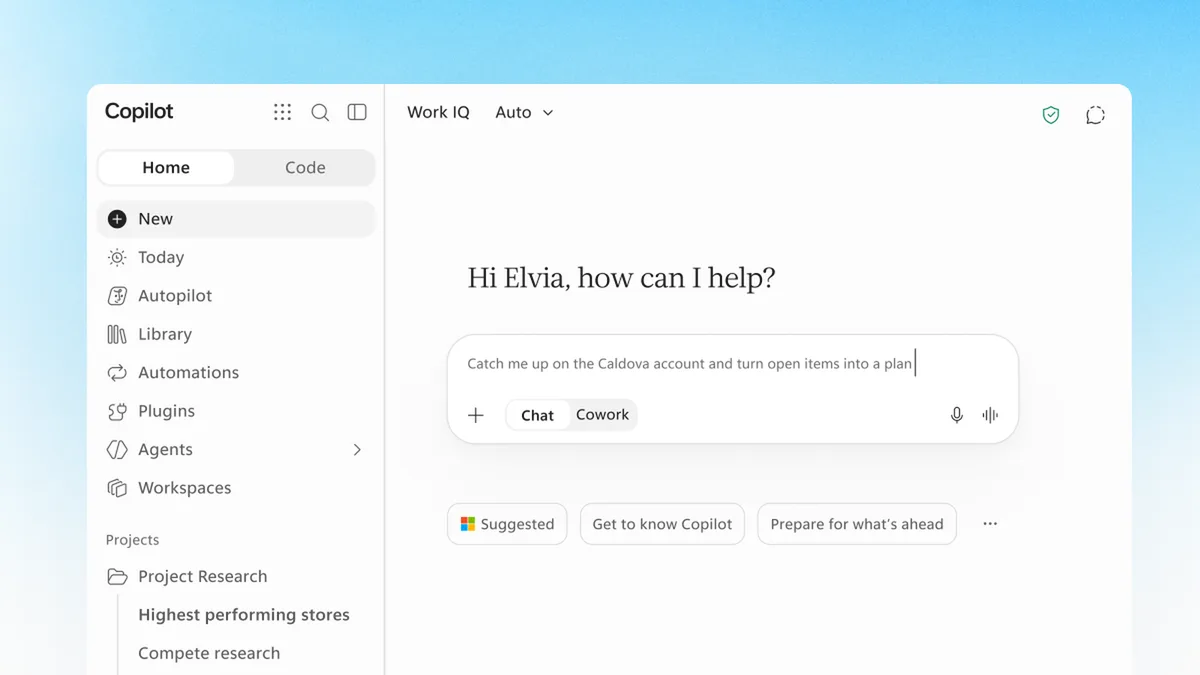
| Home | One starting point where Chat (quick questions) and Cowork (handing off a whole task) come together | Generally available |
| Office in Copilot | Create and co-edit Word, Excel and PowerPoint files inside the Copilot app | Generally available |
| Autopilot | An always-on agent you can @mention in Teams and Outlook, like a coworker | Rolling out to Frontier customers |
| Workspaces | Shared spaces where people and agents work on the same files (the new name for Copilot Notebooks) | Frontier only |
| Copilot Code | Build an app, dashboard or desktop widget by describing it | "In the coming weeks" |
| Today | A daily view of mail, calendar, Teams and tasks that needs attention | Private preview |
Frontier is Microsoft's early-access program for business customers, so most people won't see Autopilot or Workspaces yet.
Copilot's Auto routing also picks which AI model handles each request, balancing quality, speed and cost. People can still choose models from OpenAI or Anthropic by hand if their company allows it.
What can the Autopilot agent actually do?
Microsoft says Autopilot can watch Teams channels, follow up on emails, run recurring work and manage a project "without waiting for a prompt." Its example is running a supplier review from start to finish, from building the schedule to chasing people for updates. For the catch with agents that ask for sign-off, read our take on why approving AI agents is the new busywork.
Each Autopilot gets its own sign-in identity and a named manager. IT can limit what it reaches, block it at any time and see a log of everything it did. Microsoft says it can check with you before key actions.
Do Copilot Notebooks still exist?
They've been renamed. Microsoft Support says Copilot Notebooks is now Copilot Workspaces, and the blog calls Workspaces "the evolution of Copilot Notebooks." The big change is that agents can now work in the same space as your team: an agent drafts a section, you comment, and an agent picks up the comment.
Does this cost more?
Microsoft didn't announce new Copilot prices. It says creating decks and spreadsheets in Office in Copilot is "already included in your Copilot subscription license," and it keeps a separate pay-per-use option for the hardest tasks. Cowork also lets a team set a spending limit.
Microsoft's own AI group launched new in-house models too, led by MAI Code 2 for coding in GitHub Copilot. Microsoft claims MAI Code 2 gets "98% of the performance of GPT 6.1 Sol at just 40% of the cost." Those are Microsoft's own benchmark results, not outside checks.
X reactions
Our ambition with everything we are announcing at Ignite today is to parlay technological advances into real outcomes and new points of leverage for people, organizations, and society at large.
— Satya Nadella (@satyanadella) November 17, 2026
Frontier performance. A fraction of today’s prices. Built to run 24/7. Meet the new MAI models, launching today at #MSIgnite
— Microsoft AI (@MicrosoftAI) November 17, 2026
Our take
Putting Chat, Cowork and Office in one window is a real fix. Most people don't want to decide which tool or which model to use, and Auto routing takes that choice away in a sensible way.
Autopilot is the part to watch carefully. An agent that emails coworkers and runs projects without a prompt can save hours, and it can also send the wrong message to the wrong person. Microsoft's controls (its own identity, a named manager, a full log) are the right ones. We'd still keep "check with me first" turned on for anything that leaves the company until it has earned trust.
— Artificially Nerdy
What to do now
- Open Copilot at work and look for Home. It's generally available, so it may already be there.
- Using Copilot Notebooks? Look for them under the new name, Workspaces.
- Ask your IT team whether your company is in the Frontier program before expecting Autopilot.
- Keep approvals on. When Autopilot reaches you, have it check with you before it sends anything outside your team.
- Hold off on new spending. Microsoft says these features come with existing Copilot licenses, so there's no extra plan to buy for them.
FAQ
Is this coming to Microsoft 365 Personal or Family?
Microsoft's Ignite posts are about Copilot for work accounts. It didn't announce these features for home plans.
Can I still pick ChatGPT or Claude models inside Copilot?
Yes. Microsoft says employees can manually choose models from OpenAI or Anthropic, if their organization's policies allow it.
What is MAI Code 2?
It's a new coding model built by Microsoft AI, now in GitHub Copilot. A lighter version, Code 2 Flash, is meant for everyday tasks at a lower price.
How long does Ignite run?
Ignite runs through Friday, November 20, so more news could still land this week.
Sources
- Microsoft Copilot blog: Copilot at Microsoft Ignite — Jared Spataro, November 17, 2026. Home, Office in Copilot, Autopilot, Workspaces, Code, Auto routing, pricing lines.
- Official Microsoft Blog: Ignite 2026 — November 17, 2026.
- Microsoft Support: Copilot Notebooks is now Copilot Workspaces
- Microsoft AI: Ignite 2026 MAI keynote — MAI Code 2 and Code 2 Flash claims.
- Microsoft Ignite 2026 Book of News
- Satya Nadella on X — November 17, 2026, 3:44pm ET.
- Microsoft AI on X — November 17, 2026, 1:41pm ET.