
TL;DR
What is ChatGPT Finances on desktop?
OpenAI put Finances, ChatGPT's money helper, in the ChatGPT desktop app. It can now build custom tools like spending widgets. If you're in the US, you can see your budget next to your work without a browser. Before you connect accounts, decide what you're OK sharing, and keep business and personal money apart.
What did OpenAI launch?
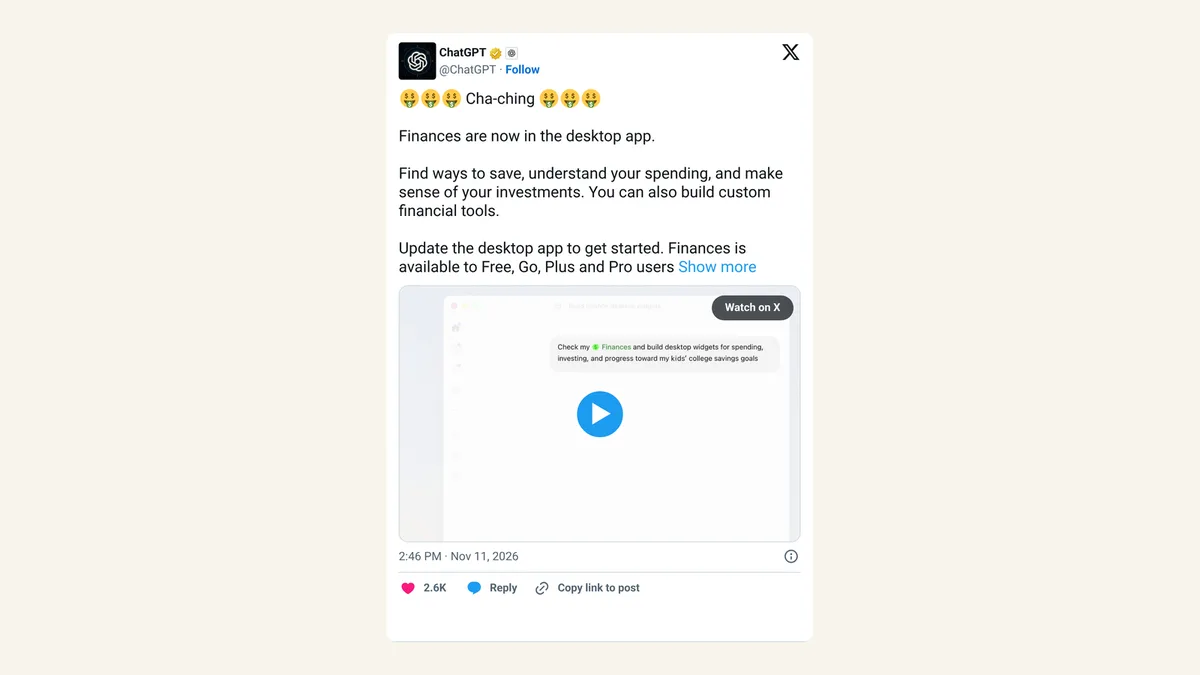
On Wednesday, November 11, 2026, OpenAI's official @ChatGPT account announced that Finances is now in the ChatGPT desktop app. Finances was already on the web, iOS and Android.
OpenAI says Finances helps you "find ways to save, understand your spending, and make sense of your investments," and that you "can also build custom financial tools." In the launch video, a user asks ChatGPT for desktop widgets covering spending, investing and a college savings goal for their kids, and ChatGPT builds and opens all three. A widget is a small, always-visible panel on your screen that shows live numbers, like a mini dashboard.
Who can use ChatGPT Finances?
| Question | Answer |
|---|---|
| Which plans? | Free, Go, Plus and Pro |
| Where? | US only |
| Extra cost? | None announced; it's part of existing plans |
| Which desktop app? | OpenAI says "the desktop app" without naming macOS or Windows |
Some coverage frames the launch as Mac only. OpenAI's post doesn't say, so check your own app after updating it.
What can the custom money tools do?
The new part is the building. Instead of asking ChatGPT a question and reading the answer, you describe a tool and it makes one. The launch video shows three:
- A spending tracker that sums up where your money went.
- An investing view that pulls your holdings together.
- A savings goal for a child's college fund, tracking progress over time.
For a freelancer, the same idea could become a widget showing this month's income against a target, or how much to set aside for taxes. It shows you your money, and the decisions stay yours. Treat its suggestions as a starting point, not financial advice.
Is it safe to connect your bank to ChatGPT?
That depends on how much you trust OpenAI with your financial data, and only you can set that line. Finances reads real account data once you connect it, and on the desktop that data now sits beside everything else you do in ChatGPT.
OpenAI's help article spells out exactly how bank links, credit checks and data deletion work. Read it in the app or on OpenAI's help site before connecting anything, and look for how to disconnect an account, since that's the step most people forget.
X reactions
One markets account saw it as new competition for brokerages:
$SCHW competition from Chat GPT
— Oracle (@OracleNYSE) November 11, 2026
OPENAI LAUNCHES CHATGPT FINANCES IN DESKTOP APP, LETTING USERS ANALYZE SPENDING, TRACK INVESTMENTS, FIND SAVINGS AND BUILD CUSTOM FINANCIAL TOOLS — AVAILABLE TO U.S. USERS ON FREE AND PAID PLANS
Our take
Widgets are a smart move. Most budgeting apps fail because people stop opening them, and a number that sits on your screen all day is hard to ignore. Building one by describing it in a sentence is the kind of AI help regular people will actually use.
We'd still start small. Connect one card, not every account, and see whether the insights are worth it before you link savings and investments too. If you run a business, keep its accounts out of your personal Finances setup so your budget and your books don't blur together.
— Artificially Nerdy
What to do this week
- Update the ChatGPT desktop app and look for Finances if you're in the US.
- Read OpenAI's Finances help article before linking a bank, card or investment account.
- Start with one account and decide after a week whether to add more.
- Try one widget prompt, such as "Make a widget showing my dining-out spending this month against a US$300 limit."
- Keep business and personal accounts separate, and remove any account you stop using.
FAQ
Can ChatGPT move money or pay bills through Finances?
OpenAI's announcement describes saving tips, spending insights, investment overviews and custom tools. It doesn't describe payments, so treat Finances as a viewer, and check the help article for the full list of limits.
Is ChatGPT Finances available outside the US?
Not yet. OpenAI says it's for US users on Free, Go, Plus and Pro.
Do I need the desktop app to use Finances?
No. It also works on the web, iOS and Android. The desktop app is the newest place to get it, along with the widgets.
Sources
- @ChatGPT on X: Finances in the desktop app — November 11, 2026, 2:46pm ET. Launch, quotes, widget demo, plans and US availability.
- Oracle (@OracleNYSE) on X — November 11, 2026, 2:48pm ET.